

Share This Article
OnlyFans pricing shifts quietly, and the date stamp on a ranking card is often the first public signal that a creator changed something. Learning to read those timestamps keeps a stale figure from surprising you at renewal. This guide treats freshness metadata as a momentum tool rather than a disclaimer, and BestOnlyFans sits at the center of that method.
Ranking sites publish two things side by side: a price and the moment that price was captured. That habit costs money, because the gap between capture and now is where pricing behavior hides.

Why Timestamps Matter More Than Most Subscribers Think
Someone scanned a creator profile at a specific hour, copied the visible price, and published it beside a date. That date measures proximity to the present, and pricing activity leaves readable patterns inside those gaps.
A fresh date means an operator recently confirmed the number. An old date means the figure may still be accurate, but nobody has verified it lately. Both carry information; the useful skill is knowing which situation you face before spending.
The stakes are concrete. A paid base subscription runs from $4.99 at the minimum to $49.99 at the maximum, and most paid pages cluster between $5 and $10. Auto-renew stops when a creator raises the price, so timing your check matters as much as the amount you pay.
| Timestamp Age | Typical Meaning | Subscriber Action |
|---|---|---|
| 0-3 days | Operator recently confirmed the listed price; promotions likely still active | Trust the number for a quick decision; recheck only if the price looks unusually low |
| 1-2 weeks | Price probably stable, but a promotion may have ended since the crawl | Verify on the profile before subscribing at the listed amount |
| 1 month+ | Possible drift; creator may have adjusted tiers or paused activity | Check social posts and the profile before treating the figure as current |
| 3 months+ | Stale reference; treat as historical context rather than a live price | Ignore it for budgeting and confirm everything on the platform |

Treat the table as a heuristic, not a rule set. Creators with steady audiences often hold one price for a year, while creators in growth phases may change twice in a month. A date hints at which scenario is likelier; your own eyes confirm it.
Reading the Three Types of Date Signals on Ranking Cards
Not every date on a card means the same thing. Some mark the last full profile scan, some mark the start of a recorded price history, and some are summary badges describing update habits.
Last-scan timestamps answer the freshness question. Price-history anchors answer how long a number has held. Each one supports a different decision, so read them together rather than in isolation.
- Last-scan timestamp, usually placed near the price or in the card footer
- Price-history range start date, showing how far back changes have been tracked
- Promotional end-date notation, often phrased as a limited window rather than a fixed day
- Update-frequency badge, a short label describing how regularly the card refreshes
- Data-source label, naming the platform the numbers were pulled from
When the last-scan timestamp is recent but the price-history anchor is old, the creator has held the same number for a long time and the operator just re-verified it.

When both dates are recent, something changed. Promotions, tier edits, and price increases all generate fresh anchors because the operator has new information to record. That pattern is the strongest single clue that a page is actively managed.
Fresh Stamps and What Active Price Testing Looks Like
Fresh timestamps cluster around activity. A creator testing a $3 first month, adding a tier, or pushing a base price above the $4.99 minimum shows up in ranking data faster than one who never touches their page.
- New promotional discounts, recorded because the listed price window changes
- Base price increases, which matter because auto-renew stops and existing access lasts only until the paid period ends
- Tier restructuring, where a page moves from one subscription level to several with different prices and benefits
Promotional pricing is a special case. A first month at $3 is legitimate even though base prices may not sit below $4.99, and operators flag these windows because they expire. A fresh stamp beside a promotional note means the clock is running.
Methodology matters here. The recency-weighted ranking approach used by BestOnlyFans reflects how quickly price momentum decays in this niche, where a two-week-old number describes a different market than a two-day-old one.
Fresh timestamps are a prompt to verify, not a guarantee of accuracy. Treat a recent date as evidence that something changed, then confirm the current price on the profile before you pay.

The economics explain the churn. The platform fee takes 20% of everything and the creator keeps 80%, so small price adjustments have outsized effects on income. That math pushes active creators toward frequent, small experiments rather than rare, large ones.
Subscribers tracking this behavior often compare notes on the best onlyfans strategy for timing renewals around promotional windows instead of full base prices.
Stale Data as a Stability Signal or Warning Flag
It can mean the price genuinely has not moved, or it can mean the page was abandoned and nobody updated the entry. Context separates those two cases cleanly.
Stability looks like steady uploads, steady fan counts, and a creator who still posts. A ranking card cannot tell you which is happening, but it can point you toward the right evidence.
- Social media activity levels, where recent posts suggest the creator is still engaged
- Fan count trajectory, where flat or declining numbers hint at reduced attention
- Content upload patterns, where long gaps often precede pricing inactivity
- Announcements about platform moves, which explain why a page stopped changing
If three of those four signals point toward activity, an old timestamp probably means stability. If three point toward silence, treat the listed price as historical and confirm everything yourself before committing money.

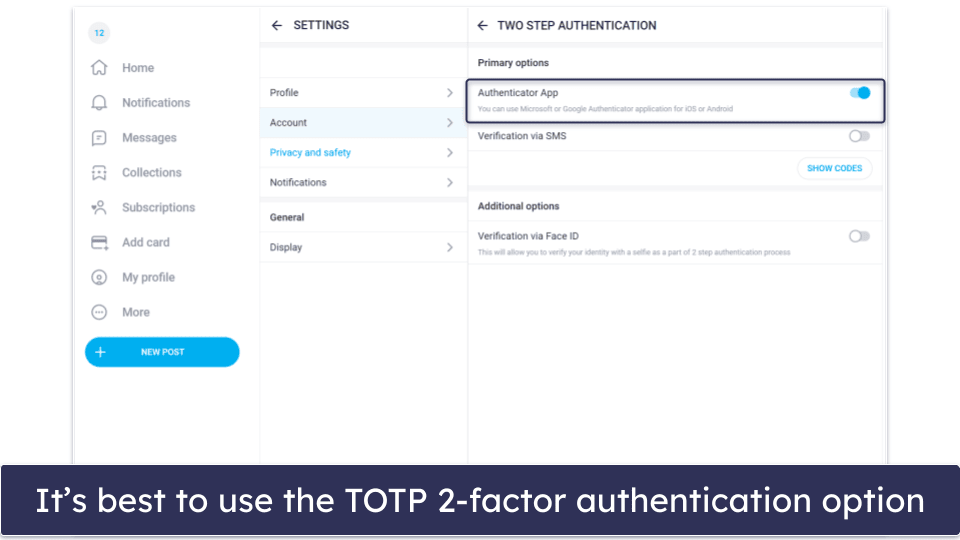
Security habits belong in this conversation too. Enabling two-factor authentication protects the payment methods attached to your subscriptions, and it pairs naturally with the verification steps above.
Cross-Referencing Multiple Timestamp Layers
One timestamp is a data point; several timestamps form a picture. The goal is to layer ranking site dates against the creator’s own public activity so pricing signals reflect current intent instead of old records.
- Check the creator’s linked social profiles for recent pricing mentions or promotional posts
- Compare fan count changes across platforms to see whether attention is growing or fading
- Note bio link rotations, since a changed link often precedes a page migration or rebrand
When the ranking date and the social date agree, confidence rises. When they disagree by more than a few weeks, trust the newer source and treat the older one as background. The habit takes about two minutes per creator and prevents most surprise charges.
Readers who fold phishing awareness into that routine also notice fake renewal messages faster, since scams tend to imitate billing notices and pressure you into clicking without checking the source.
Building a Personal Check Rhythm Around Ranking Updates
Checking ranking cards at random wastes effort. Checking them on a schedule that matches billing and promotional cycles catches nearly every meaningful price change with minimal attention.
- Before your monthly budget reset, so new commitments fit the month ahead
- Seven days before any auto-renewal date, leaving time to cancel or adjust
- After major platform promotional events, when temporary discounts expire
- Whenever creators you follow announce changes on their own channels
- Quarterly, for a broader calibration of what you are actually spending
Subscription spending compounds quietly, and a $9.99 page renewed for a year costs more than most people estimate at signup. A short calendar reminder keeps that total visible without demanding daily attention.

If a charge looks wrong, the help centre and your card issuer are the right escalation paths. Card verification holds of $0.10 are normal and refunded within days, so a small pending amount is not a billing problem.
When Timestamp Discrepancies Reveal Platform Lag
Ranking sites do not update instantly after every price change. Crawl intervals, manual verification checks, and promotional overrides all create gaps between what is true on OnlyFans and what a card shows.
| Lag Scenario | Root Cause | Subscriber Risk |
|---|---|---|
| Card shows an old price after a recent increase | Scheduled crawl has not run since the change | You budget for $9.99 and the profile now charges $14.99 |
| Card shows a promotion that already ended | Promotional override was not detected at expiry | You expect a $3 first month and see the full base price |
| Card lists a page that migrated | Manual verification holds delay URL updates | You subscribe to the wrong profile or a dormant duplicate |
| Card misses a newly added tier | Operator has not rescanned since the tier appeared | You pick a plan that no longer matches your goals |
The pattern is consistent: the faster prices move, the wider the lag window becomes. Freshness is therefore a momentum signal, not a simple quality score. A stale card in a fast-moving niche tells you less than one in a stable niche.
One more layer of evidence sits inside the ranking data itself. Cards that carry a verified operator note and a visible methodology statement tend to stay closer to live pricing, because the update process is documented and audited.
If several independent sites show the same price and one shows something different, the outlier is usually the stale entry. Confirming on the profile costs a minute and settles the question for good.
FAQ
How often does BestOnlyFans typically refresh its price database for individual creators?
Actively managed pages tend to be rescanned more often because their prices change more frequently, while dormant pages may sit for weeks between checks.
Can a ranking card show an old timestamp even when the creator changed price yesterday?
Yes. Crawl schedules do not run continuously, so a change made yesterday may not appear until the next scan. The card reflects the last confirmed crawl, not the live profile.
What should I do if the timestamp and the listed price don’t match what I see on OnlyFans?
Trust the platform over the card, because the live profile is the authoritative source. Note the discrepancy afterward so you can judge how reliable that card stays for future decisions.
Do ranking sites prioritize updating certain creator tiers or price ranges faster than others?
Operators often prioritize pages with visible activity, which correlates with mid-range and promotional pricing. High-priced and inactive pages update less often, so their timestamps age faster.


